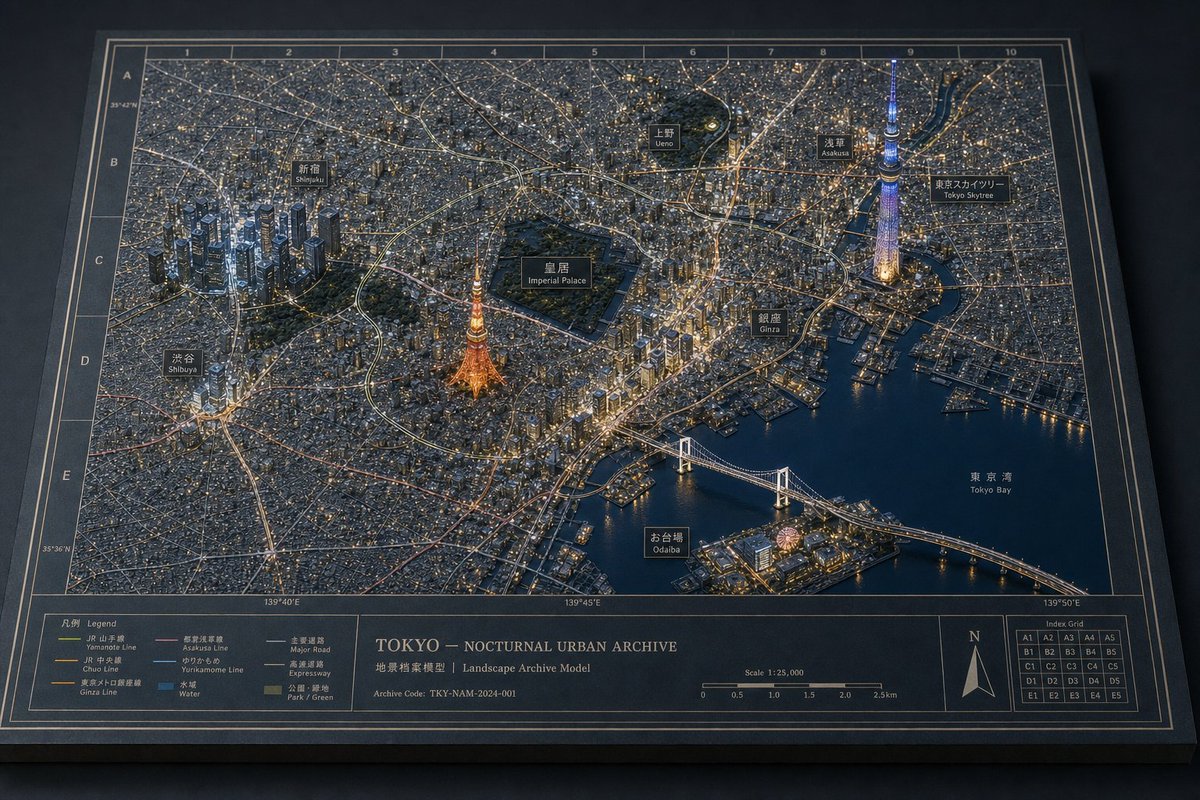
Tokyo Nocturnal Urban Archive Diorama
GPT Image 2 promptsGPT Image 2 prompt examplesGPT image promptsAI prompt examplesAI image prompt examplesOpenAI image generation promptsChatGPT image promptsprompt library
Full GPT Image 2 Prompt
Goal: Create a highly realistic physical museum-diorama map titled {argument name="city archive title" default="TOKYO — NOCTURNAL URBAN ARCHIVE"}, showing {argument name="city" default="Tokyo"} at night as a dense 3D architectural landscape archive model, photographed from an elevated oblique angle on a dark tabletop.
Canvas: Wide horizontal 3:2 composition, like a premium architectural archive board. The map fills most of the frame, with a thick dark border, thin cream drafting lines, coordinate ticks, and a bottom information strip. Use a restrained night palette: charcoal black paper, deep navy water, warm amber street lights, cool white building lights, subtle blue accents, and matte model textures.
Main scene: A detailed miniature city map combining a flat printed street plan with raised 3D building clusters. Roads glow as fine golden and white illuminated lines. Water areas are dark navy with glossy reflections. The terrain should feel tactile, with paper grain, tiny cast shadows, and realistic model-making materials. Include three prominent illuminated 3D landmarks: Tokyo Tower glowing warm orange near the lower center-left, Tokyo Skytree glowing cool blue and violet near the upper-right waterfront, and Rainbow Bridge crossing the bay in the lower-right. Include dense high-rise clusters around Shinjuku and central Tokyo, plus many low-rise city blocks.
Layout and labels: Add exactly 9 black rectangular callout labels with thin cream borders, each with Japanese text above small English text: 1) Shinjuku, 2) Shibuya, 3) Ueno, 4) Asakusa, 5) Tokyo Skytree, 6) Imperial Palace, 7) Ginza, 8) Odaiba, 9) Tokyo Bay. Place them near their corresponding areas, with subtle pointer alignment but no clutter.
Map grid: Add an archive-style index grid around the map. Use column numbers 1 through 10 along the top edge and row letters A through E down the left edge. Add small coordinate markings along the border, including latitude and longitude-style numbers. In the bottom-right information strip, include a small Index Grid box showing exactly 25 cells labeled A1 through A5, B1 through B5, C1 through C5, D1 through D5, and E1 through E5.
Bottom information strip: Along the bottom, create an archival legend and title block. Include a left legend box titled “Legend” with exactly 8 listed items and colored line samples: 1) JR Yamanote Line, 2) JR Chuo Line, 3) Ginza Line, 4) Asakusa Line, 5) Yurikamome Line, 6) Water, 7) Major Road, 8) Expressway, plus a small Park / Green swatch if space allows. Center-left title text should read {argument name="main title text" default="TOKYO — NOCTURNAL URBAN ARCHIVE"}. Below it, add “Landscape Archive Model” and an archive code reading {argument name="archive code" default="Archive Code: TKY-NAM-2024-001"}. Add a scale bar labeled “Scale 1:25,000” with distance ticks from 0 to 2.5 km. Add a north arrow in its own box near the right.
Visual style: Ultra-detailed editorial product photography, crisp focus, realistic depth, soft directional studio lighting from upper left, warm city glow, delicate shadows from raised structures, luxurious matte black board, cream ink drafting lines, museum exhibit quality. Avoid people, vehicles large enough to dominate, cartoon styling, bright daylight, messy typography, or extra landmarks beyond the labeled set.